A KOT at the station.
Send the relevant items, quantities and modifiers to the station's kitchen printer.
Luqma Cloud Kitchen POS was purpose-built for UAE ghost kitchens and multi-brand operators. Run unlimited brands from a single cashier screen — each with its own menu, pricing, kitchen routing and reporting. No workarounds. No extra accounts.
Every station gets its KOT or kitchen display. Your dispatch team gets a dedicated app to organise orders for handover.
Separate menus.
A shared operation.
Check the order.
Pack by brand.
Hand over for delivery.
Most POS products treat each brand as a separate account. You end up logging in and out, managing multiple dashboards and reconciling reports across systems. Luqma treats every brand as a first-class entity on a single platform.
Brands are first-class. Each brand has its own menu, prices, opening hours and reports — fully independent, all visible from one account.
Orders route automatically. Items from every brand reach the correct preparation station, on a KOT or kitchen display.
Reports by brand, not just by kitchen. See revenue, margins and menu performance per concept.
From the first order to the final handover.
Your cashier selects the brand at the start of each order, while keeping orders from other brands in the same workspace. Own menus. Own prices. One place to work.
Aggregator connections are available on request. Confirm the channels included in your setup.
All brands.
One workspace.

Orders from every brand route to the correct kitchen station automatically. The grill gets the grill items. The cold kitchen gets the salads. Choose a printed kitchen order ticket or a display screen for each preparation area.
Send the relevant items, quantities and modifiers to the station's kitchen printer.
See live tickets with brand labels. Bump, recall and refire from the kitchen display.
Station-level routing per menu item. Brand and order reference stay with the ticket.
The right ticket.
The right station.
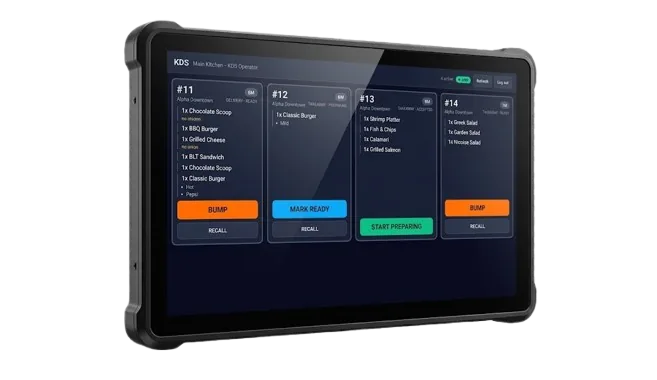
The kitchen prepares the items. The dispatch team brings the order together. Give them a dedicated dispatch screen and app to organise packing and handover across every brand.
Ready for
the right rider.

Revenue, margins and menu performance broken down per brand and per channel. See which concept is your star — and which one is using your kitchen time without the return to justify it.
Core tools for the cashier, kitchen, dispatch team and the person running it all.
Every brand has its own menu, prices, hours and reporting. One account keeps the kitchen connected.
Take dine-in, takeaway and delivery orders, select the right brand and keep orders moving.
Route items to the correct station with the brand and order reference visible on every ticket.
Send a kitchen order ticket to the printer for the station preparing the item. Use printers or displays to suit the team.
Give the packing and dispatch team its own order view, from preparation through order handover.
Keep menus, item photos, modifiers and prices organised for each concept.
Review sales, menu performance and margins by brand, channel and category.
Print the order receipt for packing and collection, with the details the dispatch team needs.
Open and close shifts, reconcile cash and review the day's activity across every brand.
Give cashiers, kitchen staff, dispatchers and managers access appropriate to their work.
Keep VAT breakdowns visible on receipts, daily summaries and Z-reports.
Capture orders on the server tablet where your operation also serves guests.
Shared or brand-specific ingredient tracking, recipe costing, stock counts and FIFO food cost reporting.
Discuss Talabat, Careem, Noon Food, Deliveroo and Keeta connections with our team. Availability depends on your setup and selected plan.
"We were running three brands out of one kitchen with two POS systems and a spreadsheet. Luqma replaced all of it. Switching brands at the cashier is a one-tap thing now."
"Menu engineering finally tells me which items earn their place. Two items we thought were stars turned out to be quietly losing money — we fixed them in week one."
FromAED 149per branch / month · + VAT
Software subscription. Hardware sold separately.
Advanced modules and integrations depend on your plan.
A cloud kitchen POS is point-of-sale software designed for ghost kitchens and multi-brand food operators. Unlike a standard restaurant POS, it manages multiple brands from a single screen — each with its own menu, pricing, kitchen routing and reporting — without switching accounts or systems.
Yes. Luqma was purpose-built for this. One cashier screen manages every brand. Each brand has its own menu, prices, hours and reports. Orders route to the correct kitchen station automatically. There is no limit on the number of brands.
Aggregator integrations with Talabat, Careem, Noon Food, Deliveroo and Keeta are available on request for Enterprise customers and are rolling out as standard add-ons. Contact our team to discuss your specific aggregator needs.
There is no hard limit. Cloud kitchen operators run 2, 5, 10 or more concepts from a single Luqma account — each fully independent with its own menu, settings, staff access and reporting.
Most operators add a new brand in under a day. You create the brand in your Luqma account, set up the menu, assign kitchen routing rules, and the brand is live on the cashier screen. No new hardware required.
Yes. Luqma is a cloud-based system that works in all 7 UAE emirates. The platform is built and hosted in Dubai. Our support team is UAE-based and responds in hours, not days.
Yes. Route kitchen order tickets (KOTs) to a station printer or use a kitchen display screen. Configure the equipment for each preparation area so the team receives the items it needs.
The dispatch team uses a dedicated order screen to organise packing and handover. Keep the order reference and brand together as an order moves from the kitchen to dispatch. Ask for a demo of the available dispatch actions for your setup.
A 20-minute call to understand your brands, your operation and your current setup. A tailored quote within 48 hours. Real humans in Dubai.