Real-Time Kitchen Orders
Orders appear on the KDS as soon as they are sent from the connected Luqma ordering workflow. No delay. No polling.
Send every item to the right kitchen station automatically. Luqma KDS keeps UAE restaurant teams — chefs, cashiers and servers — in sync from order to service.
No paper tickets to lose. No shouting across the pass. No guessing which order is next.
Order entered once.
Sent immediately.
Food is ready.
Table is informed.
Session stays open.
Paper kitchen tickets are easy to lose, easy to skip and hard to track. A KDS puts every order on screen at the station preparing it — visible, ordered and accurate.
Luqma POS also supports kitchen printers (KOT) for operations that prefer printed tickets or use both together.
One order reaches every station that needs to see it — automatically.
Dine-in preparation lifecycle
Served means the food has reached the table. The dining session stays open until the table is closed. Session completion is a separate step.
Each menu item is routed to the station responsible for preparing it. A single customer order is automatically separated across every station that needs to see it — without any manual sorting.
Station routing applies per menu item. Modifiers and quantities remain visible at the responsible station.
Example: one customer order, automatically routed
Each station receives only the items it is responsible for. Nothing extra. Nothing missing.
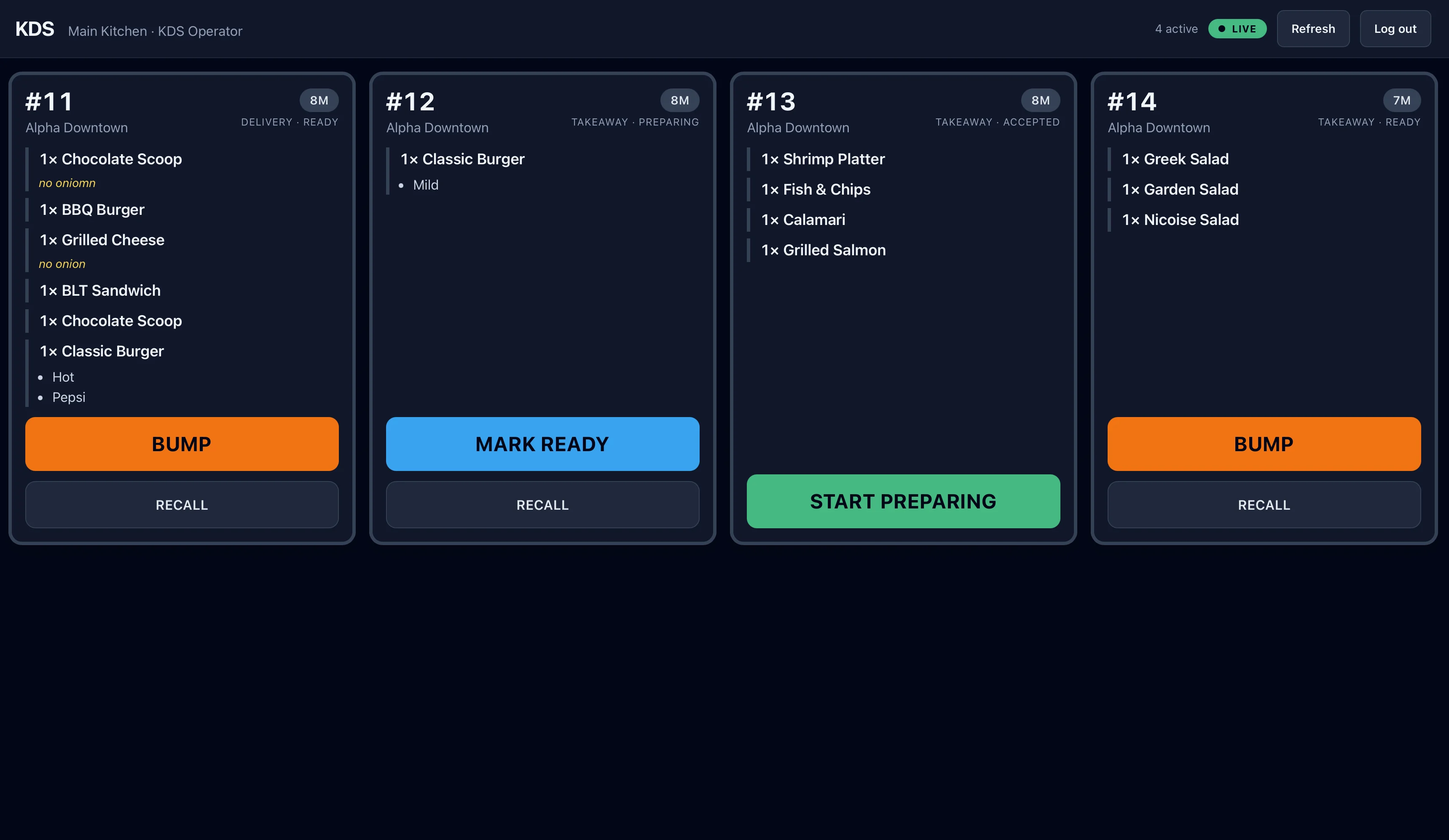
The KDS sits at the station, showing the active order queue. Kitchen staff can see everything in preparation and move tickets through the workflow without leaving their station.
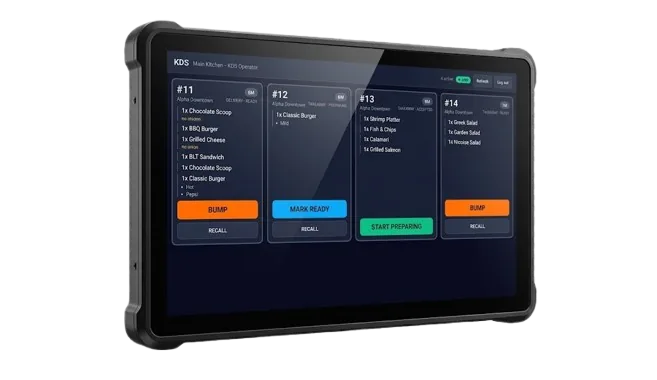
Core kitchen display capabilities built into the Luqma POS platform.
Orders appear on the KDS as soon as they are sent from the connected Luqma ordering workflow. No delay. No polling.
Route each menu item to its preparation station — grill, fry, barista, cold kitchen, dessert, packing. Stations are configurable to your layout.
Accepted → Preparing → Ready → Served. Status transitions are visually clear for kitchen staff at a glance.
Restaurants with several preparation areas can run separate displays, each focused on a different station or kitchen workflow.
When a customer adds items during an active dine-in session, the new items route correctly to the relevant stations without re-sending the original ticket.
Kitchen staff move finished tickets through the preparation workflow, keeping the active queue focused on what still needs to be done.
Luqma KDS supports kitchen workflows for dine-in, takeaway and delivery. Order type is visible on each ticket so the kitchen team knows what is being prepared for.
KDS works within the full Luqma POS workflow, including UAE 5% VAT on receipts, daily summaries and Z-reports.
The benefit of Luqma KDS is not simply another screen in the kitchen. It is that the front-of-house and kitchen use the same connected restaurant workflow — one system, one source of truth.
A comparison to help you choose what suits your kitchen setup.
| Kitchen Printer (KOT) | Luqma KDS |
|---|---|
| Printed paper ticket per order | Digital order queue on screen |
| Physical ticket — can be lost or damaged | Persistent on-screen order — always visible |
| Manual visibility — staff check the ticket pile | Accepted → Preparing → Ready → Served workflow |
| Ticket routing by printer assignment | Station-based digital routing per menu item |
| Paper-based queue — no status updates | Live kitchen queue — front of house can follow progress |
| Works well for straightforward workflows | Useful for active multi-station preparation |
| Ongoing paper and consumable cost | Screen-based — no consumables after setup |
Some restaurants use Luqma KDS as their primary kitchen workflow and remove paper tickets entirely. Others keep a kitchen printer at one station and use KDS screens at others. Some operations run both in parallel during a transition period.
Luqma POS supports KDS screens, kitchen printers (KOT), or a combination of both — configurable per station. The right choice depends on your kitchen layout, team preference and order volume.
Coordinate front-of-house and kitchen preparation across UAE restaurant operations. Each station sees its items. Servers know when food is ready without a trip to the pass.
Route coffee to the barista and food items to the kitchen simultaneously. UAE cafés with both food and beverage preparation benefit from separate station queues.
Route orders from multiple brands to the correct preparation stations automatically. Each station sees only its items — regardless of which brand the order came from.
Explore Cloud Kitchen POS ↗Keep fast-moving order queues visible and organised. A KDS handles volume better than paper — no tickets to sort, no queue to manage manually.
Manage grill, fry, drinks, dessert, cold kitchen and packing stations independently. Each team works from its own live screen without interfering with others.
Keep the kitchen informed of order type on every ticket. Takeaway and delivery orders remain clearly visible alongside dine-in preparation.
A customer places one order. Three preparation areas need to work on it simultaneously. Luqma KDS routes the right items to each station the moment the order is sent.
Each kitchen team sees only what they need to prepare. As each item is completed, the station bumps it through the workflow. When all items from the order are ready, the front of house is informed.
This works for two stations or ten. The routing is configured in advance — once a menu item is assigned to a station, it routes there every time.
Grill sees the burger. Fry station sees the fries. Barista sees the coffee. No station receives items it is not preparing.
Luqma KDS runs on a kitchen display screen positioned at the preparation station. The display is designed to be readable at a distance and usable with gloves or wet hands.
Hardware is sold separately. Screen specifications depend on your kitchen layout and station count. Contact our Dubai-based team for a hardware recommendation for your specific setup.
A kitchen display system (KDS) replaces or complements paper kitchen order tickets with a digital screen at the preparation station. Orders appear on the screen as soon as they are sent from the cashier or waiter app. Kitchen staff can see what is pending, what is being prepared, and mark items ready when complete. A KDS reduces lost tickets, miscommunication between front and back of house, and the need to print individual paper tickets for every order.
Luqma KDS is built into the Luqma POS platform — there is no separate integration or middleware to configure. When a cashier or waiter sends an order, items are automatically routed to the correct kitchen station display. The front-of-house and kitchen share the same connected workflow and the same data.
Yes. Station-based routing allows each menu item to be assigned to the preparation station responsible for it — grill, fry, barista, cold kitchen, desserts, packing, or any other station in your setup. A single customer order is automatically separated across multiple stations, so each team sees only the items it needs to prepare.
Yes. Restaurants with several preparation areas can run separate KDS screens, each focused on a different station or workflow. The grill station screen shows only grill items. The barista screen shows only drinks. Each team works from their own live queue without seeing unrelated tickets.
Luqma KDS can be used instead of a kitchen printer, alongside a kitchen printer, or you can configure different stations to use either approach depending on the workflow at that station. Luqma POS supports KOT printing and KDS screens — the right choice depends on your kitchen setup and team preference.
Luqma KDS supports kitchen workflows for dine-in, takeaway and delivery order types. For dine-in, the preparation lifecycle runs from accepted through preparing, ready and served. The order type is visible on each ticket so the kitchen team knows what is being prepared for. The dining session remains open after the food is served, and session completion is a separate step.
Yes. Cloud kitchens with multiple brands benefit from KDS routing because items from every brand route automatically to the correct preparation station. Each station sees only its relevant items regardless of which brand the order came from. See the Luqma Cloud Kitchen POS page for more on multi-brand kitchen workflows.
See how Luqma POS and KDS keep front-of-house and kitchen teams connected. A 20-minute call, a tailored setup recommendation, and a live demo of station routing in action.